


Escape
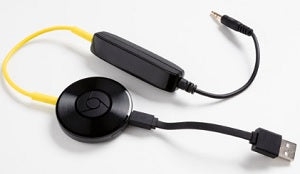
Escape Aux 2 Kit
£25.00 inc. VAT
(£20.83 ex. VAT)
Available - 2-3 Days
Adaptor kit for optional ChromeCast audio module.
(ChromeCast Audio not included)
The Escape P9 has a special compartment located underneath the keypad to install compact Wi-Fi receivers such as the Google Chromecast Audio. An Aux 2 kit must always be used in combination with any type of external Bluetooth or Wi-Fi receiver.
INSTALLATION
Step 1 –
Open the P9 keypad (for details see section 7.4 in the online user guide)
Step 2 – Preparation:
For easy installation, wire and test the Aux 2 kit and Google Chromecast Audio module before installing into the compartment. Connect the short USB power cable from the Aux 2 kit to the USB power input of the Google Chromecast Audio. Take the yellow 3.5 mm aux cable from the Google Chromecast and connect one end to the audio output of the Google Chromecast Audio module and the other end to the input of the Aux 2 module.
Step 3 – Installation:
Connect the short USB power cable to the USB power output located in the compartment.
Use the velcro kit to attach the Google Chromecast Audio module at the bottom of the compartment and place the Aux 2 module on top. Take the black aux cable output already connected to the Aux 2 module and connect the 3.5 mm jack into the Aux 2 auxiliary input located in the compartment.
Step 4 –
Set up the Google Chromecast Audio module and test the audio signal. Note that Aux 1 and USB input have both priority over Aux 2. Aux 2 should be selected as input source. Re-install the keypad.
(ChromeCast Audio not included)
The Escape P9 has a special compartment located underneath the keypad to install compact Wi-Fi receivers such as the Google Chromecast Audio. An Aux 2 kit must always be used in combination with any type of external Bluetooth or Wi-Fi receiver.
INSTALLATION
Step 1 –
Open the P9 keypad (for details see section 7.4 in the online user guide)
Step 2 – Preparation:
For easy installation, wire and test the Aux 2 kit and Google Chromecast Audio module before installing into the compartment. Connect the short USB power cable from the Aux 2 kit to the USB power input of the Google Chromecast Audio. Take the yellow 3.5 mm aux cable from the Google Chromecast and connect one end to the audio output of the Google Chromecast Audio module and the other end to the input of the Aux 2 module.
Step 3 – Installation:
Connect the short USB power cable to the USB power output located in the compartment.
Use the velcro kit to attach the Google Chromecast Audio module at the bottom of the compartment and place the Aux 2 module on top. Take the black aux cable output already connected to the Aux 2 module and connect the 3.5 mm jack into the Aux 2 auxiliary input located in the compartment.
Step 4 –
Set up the Google Chromecast Audio module and test the audio signal. Note that Aux 1 and USB input have both priority over Aux 2. Aux 2 should be selected as input source. Re-install the keypad.
£20.83